
Your family, inside Claude withFamilyWell
Ask Claude what’s on today, log the fuel, tick off the shopping. It reads and updates your lists, calendar, spending and cars, with exactly the access you allow.
https://mcp.familywell.co/mcp
OAuth sign-in · no API keys · included in every plan
- 98tools across 11 modules, plus get_today
- 12live widgets that render right in the chat
- 3 levelsper module: no access, read, or read & write
- 0API keys. You sign in, like any other app
01 · CONNECT
Three steps.
No API keys.
Add one address to your assistant, sign in to FamilyWell, and pick what it may touch. It works in any app that speaks MCP.
Claude Code · Codex · Gemini CLI
In a terminal?
Let the agent do it.
Paste the prompt below. It adds the server, opens the sign-in, and checks the connection by asking what’s on today.
Set up FamilyWell so you can help me run the household.
1. Add the server:
   claude mcp add --transport http familywell https://mcp.familywell.co/mcp
2. Run /mcp, pick familywell and finish the sign-in it opens.
3. On the consent screen pick our family. Start with Read;
   I’ll switch modules to Read & write when I need it.
4. Call get_today and tell me what’s on.
02 · PERMISSIONS
You decide what it can touch.
Every connection shows the consent screen, even for an app you’ve connected before. Each one carries its own family and its own rules.
- One family per connectionIn two families? Connect twice, with different rules.
- Everything starts at No accessTurn modules on one by one. Names and members are always visible.
- It acts as youSame sharing rules as the app. Someone’s private list stays private.
- Deletes go to a 30-day trashTasks, lists, notes, expenses and events can be restored.
- Disconnect any timeSettings → Connected apps. Idle for 30 days, it expires.
03 · TOOLS
98 tools. The same rules
as the app.
Every module you switch on brings its own tools. Writes go through the same validation and send the same notifications as the app.
- Always on2 read · always
get_todayget_family - Tasks3 read · 8 write
tasks_create_tasktasks_restore - Shopping3 read · 8 write
shopping_add_itemshopping_get_list - Spending4 read · 5 write
spending_add_expensespending_summary - Vehicles3 read · 11 write
vehicles_log_mileagevehicles_log_fuel - Calendar2 read · 8 write
calendar_listcalendar_create_event - Recipes3 read · 5 write
recipes_scalerecipes_add_to_shopping - Inventory3 read · 5 write
inventory_needs_attentioninventory_list - Projects2 read · 6 write
projects_getprojects_add_task - Notes3 read · 5 write
notes_createnotes_search - Contacts2 read · 3 write
contacts_listcontacts_create - Birthdays1 read · 3 write
birthdays_listbirthdays_add
Permanent deletes are marked destructive, so your assistant asks you first.
Full tool reference04 · WIDGETS
Live cards,
not walls of JSON.
In Claude, ChatGPT and VS Code, answers come back as interactive cards. Tick a task, mark a service done, scale a recipe, right in the chat.
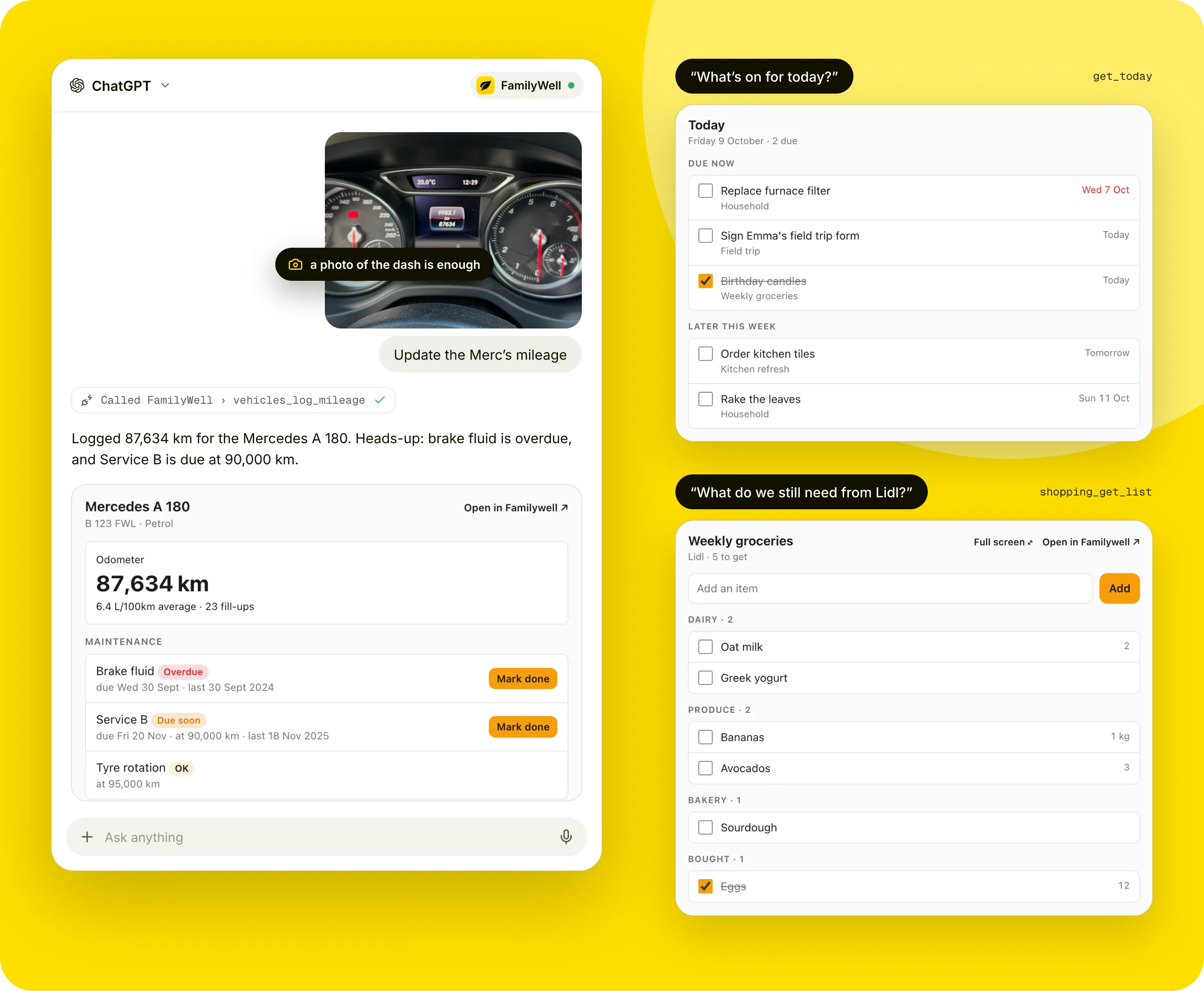
12 live widgets:TodayTasksShoppingSpendingVehicleRecipeProjectCalendarInventoryNotesContactsBirthdays
05 · SELF-HOST
Your server,
your address.
The MCP server ships with FamilyWell. Self-host it and the sign-in, tokens and permissions work exactly like on familywell.co.
# your address
https://<your host>/mcp

# or set it explicitly in .env
MCP_SERVER_URL=https://home.example.com/mcp
Read the self-hosting guide
Does my assistant see everything?
Only the family you pick and the modules you allow. Another member’s private list stays invisible, just like in the app.
We turned on Calendar later. Why can’t Claude see it?
Permissions are fixed when you allow a connection. Reconnect to include it. Settings → Connected apps marks it as Not included.
Can it file a receipt or a car document?
In ChatGPT, attach it in the chat: PDF, photo or HEIC up to 12 MB. Claude creates the record and links you to upload the file.
Which apps work?
Anything that speaks MCP with OAuth: Claude, ChatGPT, Claude Code, Cursor, VS Code, Codex, Gemini CLI and more.
Does it cost extra?
No. It’s part of every plan, and free when you self-host.
Your family, one message away.
Connect it today.
Start a FamilyWell, add the address to Claude or ChatGPT, and ask what’s on today. Included in every plan.
$5/mo or $45/yr hosted · free to self-host